What happens beneath the keys
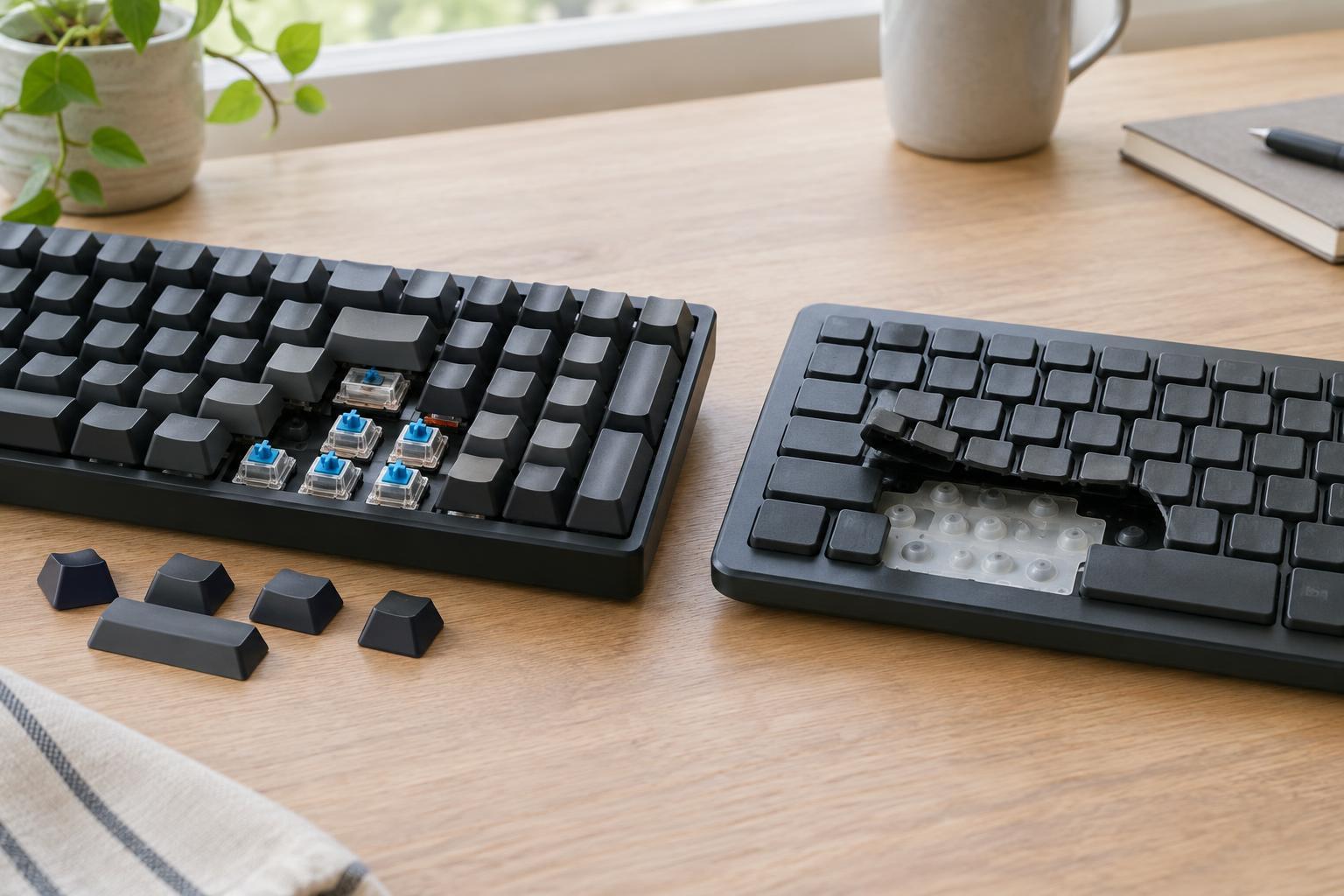
A keyboard’s feel begins with the mechanism that registers a press. In a typical membrane keyboard, pressing a key pushes a rubber dome down toward a contact layer. The dome provides resistance and springs back when you release it. Many membrane keyboards use one shared sheet of domes beneath the keys, which helps keep construction simple and the keyboard relatively thin.
A mechanical keyboard generally gives each key its own switch. Inside that switch, a spring returns the key to its resting position while contacts or another sensing mechanism register the press. Switches can be designed to move smoothly, offer a noticeable bump, or make a deliberate click. Neither construction makes a keyboard automatically better; the mechanism shapes its feel, while the rest of the design determines how pleasant it is to use.
Typing feel: consistency matters more than labels
Membrane keyboards often feel soft at the point where a key registers. Some people like that cushioned sensation, especially if they prefer a low-profile keyboard. Others find it less precise because a rubber dome may give little indication of exactly when the press has registered. Feel also varies widely between models: a well-made membrane keyboard can be more comfortable than a poorly made mechanical one.
Mechanical keyboards offer a broader range of defined feels. A linear switch travels without a pronounced bump, a tactile switch has a bump you can feel, and a clicky switch adds an audible click. Key travel and the force needed to press a key vary as well. These choices can make it easier to find a feel you enjoy, but no switch type guarantees faster typing or fewer mistakes.
The keycaps and layout deserve attention too. Keycap shape, spacing, and the angle of the keyboard affect where your fingers land. If possible, type a few full sentences rather than tapping one key repeatedly. That quick test reveals more about comfort and consistency than a switch label alone.
Noise: the switch is only part of the sound
Membrane keyboards are commonly quieter because their rubber domes cushion part of the keypress. They are not silent, though: larger keys can rattle, and a firm press against the keyboard’s base still makes noise. This may matter in a shared office or while taking calls.
Mechanical keyboards can range from fairly restrained to conspicuously loud. Clicky switches are intended to make a sound when they actuate, while linear and tactile switches generally do not add that deliberate click. Even a non-clicky switch makes noise when a key bottoms out or returns upward. The case, keycaps, desk surface, and stabilizers beneath larger keys can change what you hear.
If quiet operation is a priority, listen to the complete keyboard rather than choosing solely by switch type. Typing technique matters too: striking every key hard enough to hit the bottom will usually be louder than using a lighter touch. Sound-dampening accessories may help with some noises, but they will not turn every mechanical keyboard into a silent one.
Durability and the practical choice
Mechanical switches are often designed for repeated use, and some mechanical keyboards allow individual switches or keycaps to be replaced. That can make a repair practical when one key develops a problem. However, the switches are not the whole keyboard. A cable, connector, circuit board, or stabilizer can fail, and replaceable switches are a feature to verify rather than assume.
Membrane keyboards have fewer individually replaceable parts and are often inexpensive to replace as a complete unit. Their rubber domes may lose their original feel with heavy use, though the pace depends on the keyboard and how it is used. Keeping either type free of crumbs and spills is more useful than relying on broad durability claims. A keyboard described as spill-resistant may tolerate some accidents, but it should not be treated as waterproof unless its specifications say so.
For a quiet shared space, a membrane keyboard or a carefully chosen non-clicky mechanical model is a sensible starting point. For someone who values a specific tactile feel or the option to replace keycaps and, on compatible models, switches, a mechanical keyboard may justify its higher cost. Compare the full keyboard—including layout, sound, build quality, and repair options—against your daily needs rather than choosing by mechanism alone.